
How to Maintain Outdoor 3D Interactive Floor Projections
- How to Maintain Outdoor 3D Interactive Floor Projections
- Understanding Outdoor Projection Mapping 3D Interactive Floor Projection Systems
- Design for Maintainability: Plan Ahead for Outdoor Use
- Weatherproofing and Enclosure Maintenance for Interactive Floor Projection
- Optics and Lens Care: Keep the Image Sharp
- Projector Electronics, Cooling and Power Management
- Sensors and Interaction System Calibration for Interactive Floor Projection
- Ground Surface Preparation and Cleaning to Preserve Interaction Quality
- Software, Content and Network Health Checks
- Routine Inspection Checklist and Maintenance Schedule
- Troubleshooting Common Issues in Outdoor Projection Mapping 3D Interactive Floor Projection
- Safety, Accessibility and Compliance Considerations
- Brand Advantages: Why Choose Our Outdoor Projection Mapping 3D Interactive Floor Projection
- FAQ — Frequently Asked Questions about Maintaining Interactive Floor Projection
- Contact Us / View Product
- References
How to Maintain Outdoor 3D Interactive Floor Projections
Understanding Outdoor Projection Mapping 3D Interactive Floor Projection Systems
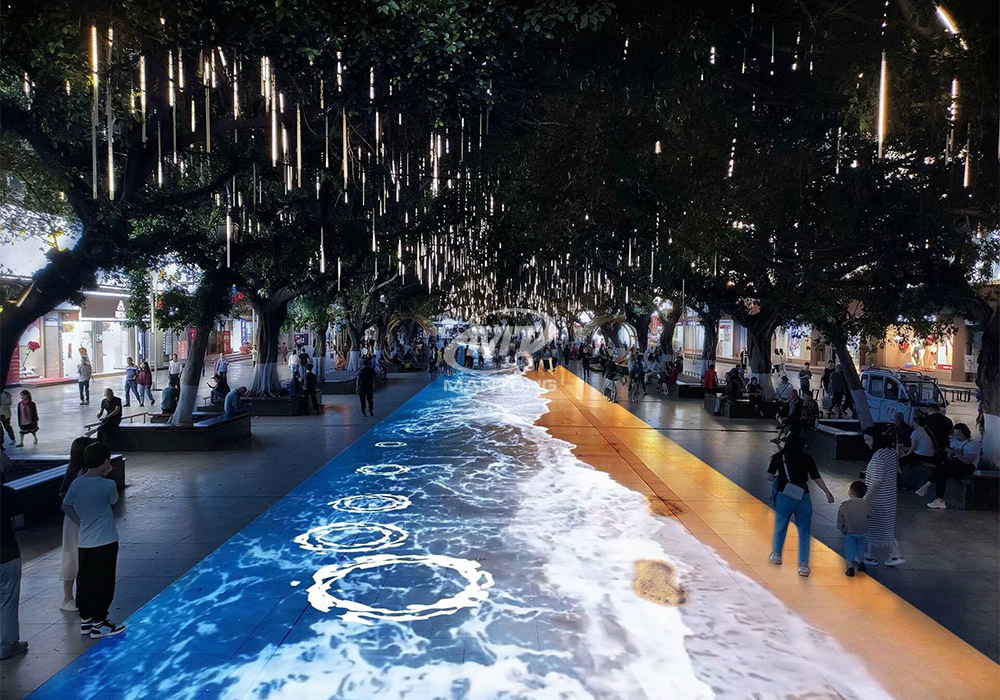
Outdoor Projection Mapping 3D Interactive Floor Projection systems combine high-brightness projection mapping with interactive tracking technologies to produce immersive, large-scale experiences on ground surfaces. These systems typically integrate one or more high-output projectors, lenses, weather-rated enclosures, interaction sensors (cameras, IR arrays, LIDAR or depth sensors), mounting hardware, content servers and control software. Proper maintenance keeps the installation visually sharp, responsive, and reliable—critical for safety, public perception and return on investment. When we say Interactive Floor Projection in this guide, we mean the full system: optics, mechanics, electronics, sensors and software working together outdoors.
Design for Maintainability: Plan Ahead for Outdoor Use
Successful long-term upkeep begins at the design stage. Choose components and housings rated for outdoor use (IP-rated enclosures), ensure easy access for service, and design cable routing and mounts that minimize water pooling and dust ingress. Selecting LEDs or laser-phosphor projectors (instead of lamp-based units) can reduce lamp replacements and downtime because many modern light engines advertise 20,000–50,000 hours of life. Also specify service access panels, replaceable filters, and local power protection (surge suppression, UPS) to protect electronics from environmental and electrical hazards.
Weatherproofing and Enclosure Maintenance for Interactive Floor Projection
Outdoor enclosures and mounts are the first line of defense against rain, dust and temperature extremes. Check seals, gaskets and cable gland fittings every 3–6 months. Clean and replace dust filters per manufacturer recommendations—usually more frequently in dusty or coastal environments. Verify that enclosure ventilation and temperature control (fans, thermostats, or HVAC for large cabinets) function correctly so the projector operates within its specified ambient temperature range. If condensation is detected, investigate humidity control and drainage—standing water or trapped moisture can rapidly damage optics and electronics.
Optics and Lens Care: Keep the Image Sharp
Projector lenses and any external protective windows are critical to image quality. Inspect lens surfaces monthly for dust, fingerprints or abrasive debris. Use only manufacturer-recommended lens-cleaning tools: a blower, microfiber cloths, and specialty lens cleaning solutions when required. Avoid household glass cleaners and rough paper products; they can damage anti-reflective coatings. For protective windows on enclosures, keep both interior and exterior surfaces clean—pollutants trapped between the window and lens cause glare and loss of contrast. If the protective window becomes scratched or hazed, replace it rather than attempting heavy polishing.
Projector Electronics, Cooling and Power Management
Projector reliability hinges on stable power and effective cooling. Implement surge protection and consider a UPS to allow controlled shutdowns during outages. Schedule electrical inspections annually to check connections, grounding and power-quality issues. Maintain cooling systems—clean intake/exhaust grills, replace or clean fans and filters, and ensure thermostats are calibrated. For laser or LED projectors that advertise long life, still verify firmware updates and keep internal diagnostics under review; many units log temperature warnings or warning hours that can predict failures.
Sensors and Interaction System Calibration for Interactive Floor Projection
Interactive tracking components (cameras, IR emitters and receivers, depth sensors) require regular cleaning and calibration to ensure accurate interaction. Clean sensor windows monthly and recalibrate sensors after any movement of the projector or mounting structure. For camera-based systems, run an automated calibration routine weekly or after environmental changes (lighting, new obstacles). For IR or LIDAR systems, remove reflective debris from the floor area and verify that ambient lighting conditions do not create false positives. Document calibration baselines so you can quickly restore correct behavior after a service event.
Ground Surface Preparation and Cleaning to Preserve Interaction Quality
The projection surface quality dramatically affects both image fidelity and sensor tracking. Keep the floor surface free of loose gravel, oil, wet patches and reflective litter. Clean protocols depend on surface type (concrete, pavers, treated wood) but should avoid abrasive treatments that introduce texture changes. For painted or treated floors used to enhance contrast, inspect coatings annually and touch up wear areas promptly. If the interactive experience relies on floor markers or fiducials, ensure those remain intact and resistant to pedestrian wear.
Software, Content and Network Health Checks
Interactive Floor Projection systems are as much software as hardware. Maintain a regime of software updates, backups and content version control. Schedule weekly checks of server health (CPU, disk, RAM), automated backups of content and configuration, and monthly verification of content playback logs. Implement remote monitoring where possible—many systems support telemetry that reports projector lamp hours, temperatures, and sensor errors. Network segmentation and firewalls protect control systems from external threats; perform security audits periodically.
Routine Inspection Checklist and Maintenance Schedule
Creating a practical, repeatable checklist reduces missed steps and helps non-specialist staff perform day-to-day checks. Below is a recommended schedule; adapt frequencies for local climate and usage intensity.
| Task | Daily | Monthly | Quarterly | Annually |
|---|---|---|---|---|
| Visual inspection (mounts, enclosure) | ✓ | ✓ | ✓ | |
| Clean external windows & lens | ✓ | ✓ (replace if needed) | ||
| Sensor calibration | ✓ (quick check) | ✓ (full recalibration) | ✓ | |
| Enclosure filter replacement | ✓ | ✓ (or as needed) | ✓ | |
| Power & UPS check | ✓ | ✓ (battery & grounding) | ||
| Firmware & software updates | ✓ | ✓ (full audit) |
Source note: Schedule is based on industry best practices and should be adapted to site conditions and manufacturer recommendations.
Troubleshooting Common Issues in Outdoor Projection Mapping 3D Interactive Floor Projection
Quick troubleshooting steps reduce downtime. Common symptoms and first checks:
- Dim or uneven image: Check projector brightness mode, lens cleanliness, and verify the protective window is clean; confirm no drift in projector geometry/keystone settings.
- Loss of interaction or lag: Recalibrate sensors, check network latency, and ensure ambient IR or sunlight isn't overwhelming sensors.
- Intermittent shutdowns: Inspect enclosure temperature logs, confirm fans/filters are operating; check UPS and mains stability.
- Color shifts or flicker: Verify cable connections (HDMI/SDI/DP), test with a backup source; check for graphics card or media server issues and hardware thermal throttling.
Safety, Accessibility and Compliance Considerations
Outdoor interactive projections often operate in public spaces. Maintain clear signage, ensure safe cable routing to avoid trip hazards, and verify that installations do not create glare into drivers' sightlines or violate local lighting ordinances. Keep maintenance records for warranties and insurance. If your system uses lasers, comply with laser safety standards and post required notices.
Brand Advantages: Why Choose Our Outdoor Projection Mapping 3D Interactive Floor Projection
Our Outdoor Projection Mapping 3D Interactive Floor Projection solution is engineered for durability, serviceability and maximum uptime. Key advantages include:
- IP-rated enclosures with service access panels for fast field maintenance
- High-brightness, long-life laser/LED light engines to reduce optical service interventions and lower total cost of ownership
- Modular sensor bays for fast replacement and recalibration in the field
- Remote monitoring and alerting to proactively catch issues before public hours
- Comprehensive maintenance documentation and optional service contracts tailored to site conditions
These features shorten on-site service time and make routine maintenance predictable and cost-effective, preserving the integrity of the interactive experience and safeguarding your investment.
FAQ — Frequently Asked Questions about Maintaining Interactive Floor Projection
Q: How often should I replace projector filters and protective windows?
A: Replace filters per manufacturer guidance or sooner in dusty environments—typically every 3–12 months. Protective windows should be inspected monthly and replaced when scratched, hazed or if anti-reflective coatings degrade.
Q: Can I clean the projector lens myself?
A: Yes—use a blower, soft brush and microfiber cloth. Use licensed lens-cleaning solutions if needed. Avoid household cleaners and abrasive materials. If in doubt, consult the product manual or use a trained technician.
Q: What maintenance does the interaction system require?
A: Regular cleaning of sensor windows, weekly or monthly calibration routines, and ensuring ambient lighting conditions remain stable. Keep sensor firmware updated and document calibration baselines.
Q: How do weather and temperature affect the system?
A: Extreme heat reduces projector life and can trigger thermal shutdowns; cold can affect LCD panels and batteries. Use climate-controlled enclosures or ventilation and monitor temperatures with telemetry to prevent thermal damage.
Q: What is the expected lifetime of the light source?
A: LED and laser-phosphor engines commonly quote 20,000–50,000 hours under optimal conditions. Actual life depends on operating temperature, mode and maintenance. Regular cleaning and good cooling extend lifespan.
Contact Us / View Product
If you'd like a site-specific maintenance plan or to view our Outdoor Projection Mapping 3D Interactive Floor Projection solutions, contact our support team for a consultation or to schedule a demo. Call us, email support@example.com, or visit our product page to request a quote and service plan. Let our specialists design a maintainable system tailored to your location and traffic profile.
References
Sources and further reading:
- IEC 60529, Degrees of protection provided by enclosures (IP Code) — International Electrotechnical Commission (IEC)
- IP Code — Wikipedia: https://en.wikipedia.org/wiki/IP_Code (overview of ingress protection ratings)
- Projector manufacturer maintenance and product pages (examples include Barco, Christie, Epson) — consult your projector model's official manual for specific maintenance intervals and cleaning procedures
- AVIXA (formerly InfoComm) guidelines and best practices for audiovisual system installation and maintenance
The latest trends for interactive floor projectors in 2026 | Mantong Ultimate Insights
How to Choose the immersive game room manufacturer and supplier in China?
What is interactive floor projection ? | Ultimate Insight
Immersive 360 Projection vs VR: Which Is Better for Events?
One-Stop Projection Solution Provider Since 2011
Are you trader or manufacturer ?
We are direct manufacturer who specialize in providing one-stop solution for different outdoor & indoor projection project with our stable software and qualified projectors
What information do you need to know before making the proposal/solution?
We know that everyone wants to know the price, but the price of our products is determined by many factors since most of our products are custom, so no ready price list. In order to fast understand what you need, can you send us an inquiry like this?
For example: I am really interested in your immersive projection products, we are a company in the USA and want to install some in my restaurant. It is about 50 meters long, and 5m in width. Projection size you can decide but the length should be not less than 20 meters. We want some content about SeaWorld because our place is all about the sea. Thank you.
What's the application of Immersive projection ?
It can be used in various venues, such as art exhibition, entertainment venues, educational institution, Wedding hall /Banquet/Bar,Yoga Studio and so on. It often involves advanced projection techniques, multimedia content, and interactive elements to engage and captivate the audience's senses.
What about the wall/floor material for the projection?
It’s recommended to choose a light-colored material with minimal reflectivity—pure white or light grey works best. the
common material is cement & plaster board
For optimal projection results, the surface should be free of any patterns or textures, as the projector will display content
directly onto it.
There are no specific material requirements; you may use any commonly available material in your local market, as long as it
meets the above conditions.
What's Immersive Projection ?
Immersive projection refers to a technology that creates a captivating and all-encompassing visual experience for viewers by projecting images or videos onto large surfaces, such as walls, floors, or even entire rooms. This technology aims to immerse the audience in a simulated environment, blurring the boundaries between the physical and virtual worlds.

Outdoor Projection Mapping 3D Interactive Floor Projection
Combining projection mapping with 3D interactive ground projection technology brings an unprecedented immersive experience to outdoor scenes.

Indoor Interactive Floor Projector System - Customized Design & Installation Support
Indoor interactive floor projections display dynamic themed videos on the floor, commonly used in venues aiming to enhance brand influence or attract foot traffic, such as restaurants, hotel corridors, and brand car retail stores.
By using projectors and compatible software, the interactive content is projected onto the floor, encouraging engagement between people and the projected visuals. A single 5500-lumen indoor floor projector can cover an area of 5 m × 3 m. Typically, each project will use at least 3 units to ensure broad coverage and optimal visual effects.
We also offer customized design and installation support to enhance the interactive experience for your venue.

Amusement Rapidly Rotating Bouncing Sphere Interactive Wall Floor Projection Sports Games
Rapidly Rotating Bouncing Sphere is an interactive space where participants jump on rotating spheres. As they step on it, the spheres surface will show special interactivity
Jumping on spheres of the same color in succession causes them to pop, releasing light particles. The more consecutive jumps, the greater the reward—caterpillars appear, and eventually, all spheres of that color burst, filling the space with light and even more caterpillars.

Mantong 6500LM High-Lumen Projector for Large-Scale Immersive Room Projection
Transform any space with Mantong's immersive projection mapping systems. Our high-lumen projectors (up to 6500 LM) and custom software create captivating interactive experiences for floors and walls. Ideal for museums, events, retail, and hospitality. Each kit includes professional ceiling mounting and 80+ pre-loaded video contents and is backed by a 12-month warranty and CE certification. We offer full customization and support to bring your vision to life.

Kaida Business Center, Shixin Road, Panyu District,Guangzhou City, Guangdong Province, China.
ManTong
ManTong
ManTong