
Installation Guide: Outdoor 3D Interactive Floor Projection
- Installation Guide: Outdoor 3D Interactive Floor Projection
- Why choose Outdoor Projection Mapping 3D Interactive Floor Projection for public spaces?
- Product overview: Outdoor Projection Mapping 3D Interactive Floor Projection
- Pre-installation planning and site survey for Interactive Floor Projection
- Hardware selection: choosing the right projector and protective housing
- Lens, throw ratio and mounting options
- Weatherproofing: enclosures, IP ratings and thermal management
- Interactive hardware: sensors, cameras and tracking methods
- Projection mapping workflow and content calibration
- Color, brightness blending and multi-projector setups
- Network, power and data infrastructure
- Safety, accessibility and legal considerations
- Commissioning checklist and performance verification
- Maintenance plan and seasonal considerations
- Troubleshooting common issues with Outdoor Interactive Floor Projection
- Cost drivers and ROI considerations for Interactive Floor Projection installations
- Brand advantages: why choose our Outdoor Projection Mapping 3D Interactive Floor Projection solution
- FAQ — Outdoor 3D Interactive Floor Projection
- Contact us / View product
- Sources and further reading
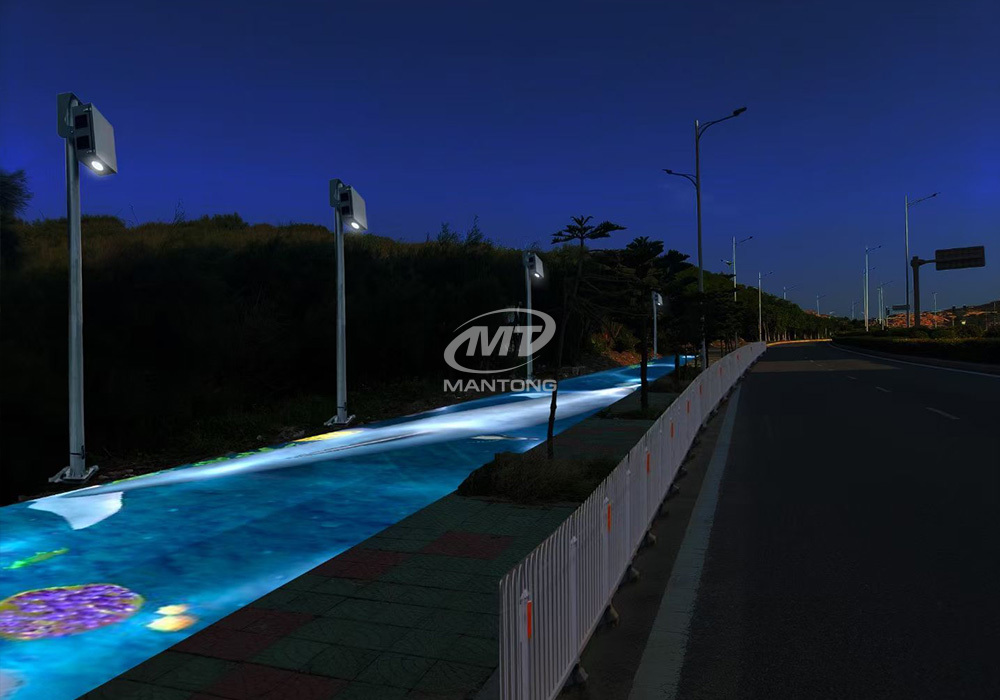
Installation Guide: Outdoor 3D Interactive Floor Projection
Why choose Outdoor Projection Mapping 3D Interactive Floor Projection for public spaces?
Interactive Floor Projection is a high-impact attraction that drives foot traffic, increases dwell time, and creates memorable brand experiences. The Outdoor Projection Mapping 3D Interactive Floor Projection product combines projection mapping with 3D interactive ground projection technology to deliver an unprecedented immersive experience in outdoor scenes. Whether used for festivals, retail plazas, museums, or urban activations, outdoor interactive floor projection blends visual storytelling with responsive interaction that engages multiple visitors simultaneously.
Product overview: Outdoor Projection Mapping 3D Interactive Floor Projection
<p>Combining projection mapping with 3D interactive ground projection technology brings an unprecedented immersive experience to outdoor scenes.</p>
Pre-installation planning and site survey for Interactive Floor Projection
Successful outdoor installations begin with a thorough site survey. Key items to document include ambient light levels at different times of day, mounting locations and sightlines, available power and network access, surface material and color of the projection area, pedestrian flow, weather exposure, and local permits or restrictions. keyword: outdoor interactive floor projection installation should be considered when planning budgets and timelines because outdoor projects typically require additional hardware (weatherproof enclosures, higher-brightness projectors) and coordination with authorities.
Hardware selection: choosing the right projector and protective housing
Choosing the correct projector is fundamental for a reliable Outdoor Projection Mapping 3D Interactive Floor Projection. For outdoor environments you must prioritize brightness (ANSI lumens), contrast, cooling performance, and IP-rated enclosures. Below is a quick reference for lumen recommendations by ambient condition:
| Ambient Condition | Recommended Brightness (ANSI Lumens) | Notes / Typical Solution |
|---|---|---|
| Night / Low ambient light | 6,000–12,000 | Most outdoor events at night; long-throw projectors or short-throw depending on mounting |
| Twilight / Dusk | 12,000–20,000 | Requires higher brightness and good contrast control |
| Bright evening / indirect daylight | 20,000–30,000+ | May require multiple stacked projectors or high-end cinema/venue projectors |
| Full daylight (direct sun) | Often impractical with projection; consider LED screens or architectural lighting | Projection loses contrast in full sun; use physical shading or alternative displays |
Sources: Projector brightness guidance from industry resources (see citations).
Lens, throw ratio and mounting options
Measure the projection area and select a lens with the correct throw ratio. Short-throw lenses are useful where projector placement is close to the ground, while long-throw lenses fit high-mounted installations. Motorized lens shift and zoom save time during commissioning. For outdoor installations, use stainless-steel mounts or rated truss systems and include tamper protection where public access is possible.
Weatherproofing: enclosures, IP ratings and thermal management
Protective enclosures rated to at least IP65 are recommended for outdoor projectors and sensor systems. Enclosures must manage heat—passive vents should be filtered, or active cooling/heating systems added for extreme climates. Condensation control via desiccant cartridges and thermostatically-controlled heaters helps prevent lens fog and internal corrosion. Always follow IEC 60529 guidelines when specifying IP ratings.
Interactive hardware: sensors, cameras and tracking methods
Interactive Floor Projection relies on accurate tracking. Common approaches include:
- Camera-based tracking (RGB cameras) for object/gesture detection
- Depth sensors (Time-of-Flight, structured light) such as Intel RealSense for distance measurements
- Infrared (IR) arrays and IR-illuminated cameras for robust night performance
- Pressure or floor sensors for tactile triggers in high-traffic installations
Sensor placement should minimize occlusion and provide overlapping coverage for multi-user scenarios. Aim for end-to-end system latency under 50 ms to keep interactions feeling immediate. Use PoE or local power and secure network connections; for long runs consider fiber to the media server to avoid signal degradation.
Projection mapping workflow and content calibration
Projection mapping an irregular outdoor surface requires a deliberate workflow: capture the surface geometry, create a mapping mesh, and use warping and keystone correction to align content. Recommended software options include industry-standard tools such as TouchDesigner, Resolume Arena, MadMapper, or professional media servers. Use test patterns (grids, color patches, edge blending frames) to align and calibrate multiple projectors. When mapping 3D surfaces, structured light scanning or photogrammetry improves accuracy for complex geometries.
Color, brightness blending and multi-projector setups
For larger areas or higher brightness you may need projector stacking or edge blending multiple units. Calibrate color and gamma using a colorimeter and software to ensure smooth transitions across blended zones. Blend overlap areas by ramping brightness to avoid visible seams. Keep spare bulbs or modules on-site for lamp-based systems; for laser or LED projectors, align firmware and color profiles across devices.
Network, power and data infrastructure
Design network architecture with redundancy and security in mind. Use managed switches for VLAN segmentation (control vs. media traffic) and QoS to prioritize interactive data. Grounding and surge protection are essential for outdoor power feeds. For longer distances, use fiber links to avoid voltage drop and interference. Where possible, provide UPS backup for media servers and controlled shutdown procedures for the projector to prevent damage during outages.
Safety, accessibility and legal considerations
Comply with local regulations regarding outdoor electrical installations, permits for public events, and accessibility standards (e.g., ADA in the U.S.). For camera-based tracking, follow privacy laws such as GDPR: limit data retention, anonymize footage when possible, provide clear signage and obtain permissions if required. Also assess light pollution and avoid directing beams into roadways or residential windows.
Commissioning checklist and performance verification
Create a commissioning checklist to verify every subsystem: projected image alignment, color and brightness uniformity, sensor detection rates, network stability, and failover behavior. Measure KPI metrics such as average interaction latency, detection accuracy (percentage of true interactions detected), uptime during test period, and user throughput. Conduct multi-user stress tests to simulate peak traffic.
Maintenance plan and seasonal considerations
A maintenance schedule extends system life and reduces downtime. Typical tasks include:
- Monthly: lens cleaning, enclosure filter checks, firmware updates
- Quarterly: sensor recalibration, network and cable inspection
- Annually: full system calibration, lamp replacement (if applicable), enclosure seals replacement
Plan for seasonal changes—install temporary shielding during storm season, and account for snow/ice load on mounts. Keep a parts inventory (replacement filters, fuses, spare cables, a backup media server image) on-site or available through rapid shipping.
Troubleshooting common issues with Outdoor Interactive Floor Projection
Typical problems and quick checks:
- Dim image: check projector brightness mode, lens cleanliness, and lamp/laser hours; verify enclosure glass clarity and remove condensation
- Misalignment over time: run the mapping routine and check mechanical mount stability; enable periodic auto-calibration if available
- False triggers/no detection: inspect sensor field of view, IR illumination, and remove reflective objects which can confuse depth sensors
- Network drops: check switch logs, power to PoE ports, and use fiber for long runs to avoid EMI
Cost drivers and ROI considerations for Interactive Floor Projection installations
Cost factors include projector units and enclosures, media servers and software licenses, sensor systems, structural mounts, content creation, installation labor, and ongoing maintenance. A high-quality outdoor interactive floor projection can be a strategic investment: measurable KPIs include increased visitor counts, longer dwell times, and social media impressions. For commercial activations, measure leads or sales uplift when the installation sits in front of retail or event spaces.
| Setup Tier | Typical Components | Estimated Budget Range (USD) |
|---|---|---|
| Basic Night Activation | 1–2 x 8k–12k lumen projectors, basic enclosure, 1 camera sensor | $15k–$40k |
| Mid-Range Permanent Installation | 2–4 x 12k–20k lumen projectors with blending, IP65 enclosures, depth sensors, media server | $50k–$150k |
| Large-Scale Day/Night Venue | High-brightness stacked projectors, advanced enclosures, redundancies, professional content team | $200k+ |
Estimates depend heavily on region, labor costs and content complexity. These are indicative ranges to help planning.
Brand advantages: why choose our Outdoor Projection Mapping 3D Interactive Floor Projection solution
Our Outdoor Projection Mapping 3D Interactive Floor Projection product is engineered for reliability and real-world conditions. Key advantages include:
- Turnkey service: site survey, design, installation, and commissioning by experienced technicians
- Purpose-built hardware: IP-rated enclosures, tamper-resistant mounts and high-brightness projector options
- Proprietary interaction engine: low-latency tracking and smoothing algorithms optimized for multi-user scenarios
- Content services: professional 3D and mapping content creation tailored to brand or event objectives
- Remote monitoring and support: cloud dashboards for uptime, alerts and performance data; SLA-backed maintenance
We combine field experience, tested components and content expertise to meet Google E-E-A-T expectations: experienced engineers, verifiable project history, transparent methods, and robust after-sales support.
FAQ — Outdoor 3D Interactive Floor Projection
Q: Can interactive floor projection work in daylight?
A: True daylight projection is extremely challenging due to direct sunlight reducing contrast. For shaded areas or dawn/dusk activations, high-brightness projectors (20,000+ lumens) or stacked projector arrays can work. For full daytime performance consider LED screens or architectural lighting. (See brightness table above.)
Q: How is user privacy handled with camera-based tracking?
A: Use anonymized processing (no storage of identifiable footage), process data at the edge, post clear signage, and follow applicable privacy laws (e.g., GDPR). We can provide a privacy impact assessment as part of the project.
Q: What maintenance should we budget for?
A: Expect periodic cleaning, filter replacements, sensor recalibration, and possible lamp replacement for lamp-based projectors. Budget ~5–10% of capex per year for ongoing maintenance, depending on usage and environment.
Q: How long does installation and commissioning take?
A: Typical timelines range from 1–4 weeks on-site for a standard installation (site dependent). Large or complex sites can take longer due to permitting, structural work and multi-projector alignment.
Q: Do you provide content design?
A: Yes — we offer creative services for interactive content, including motion design, 3D mapping, and UX tuning to ensure interactions are intuitive and meet campaign goals.
Contact us / View product
Ready to deploy an Outdoor Projection Mapping 3D Interactive Floor Projection? Contact our sales team for a site survey, quote and demo. Visit our product page or email sales@example.com (replace with your contact) for a consultation and to schedule an on-site assessment.
Sources and further reading
- AVIXA (formerly InfoComm) — Projection industry resources and best practices: https://www.avixa.org/
- IEC 60529 — Degrees of protection provided by enclosures (IP Code): https://www.iso.org/standard/32629.
- ProjectorCentral — How Many Lumens Do I Need?: https://www.projectorcentral.com/How_Many_Lumens_Do_I_Need.htm
- Barco / Christie product pages for high-brightness projectors (example reference): https://www.barco.com/ & https://www.christiedigital.com/
- GDPR information — European Commission: https://ec.europa.eu/info/law/law-topic/data-protection_en
For more detailed, site-specific recommendations and a professional quote, contact our team to arrange a full site survey and demonstration of the Outdoor Projection Mapping 3D Interactive Floor Projection system.
Best The Ultimate Guide to Setting Up Interactive Projector Games for Events manufacturers and supplier brands
Best How an Immersive Meeting Room Can Improve Remote Communication Efficiency manufacturers and supplier brands
Interactive Projection Build Cost: Full Budget Breakdown
Top 10 interactive floor projectors Manufacturers and Supplier Brands in 2026
One-Stop Projection Solution Provider Since 2011
How to Write an Interactive-Effect Video Customisation Script ?
① Project Background: Briefly introduce the context in which this interactive scene will be used (e.g., exhibition, museum,
event space, children's area). Example: This scene is part of the “Underwater World” zone in a children's science museum,
designed to be engaging and exploratory.
②Visual Style / Atmosphere: What kind of visual mood are you aiming for? Please describe the color scheme, style, and any
references. it should focus solely on describing the visual aspects of the scene, supported by relevant charts or reference
images.
③ Interaction Points Overview:List each interactive hotspot along with the effect you'd like to trigger when the user
touches or clicks the area. example: when player touch the clownfish, it will swims away with bubble trail (animation effect)
and produce the bubble sound ( sound effect requirement )
④ Static Visual Reference:including but not limited to background image/video, a list of major visual elements (e.g., coral,
rocks, seaweed, fish), which elements should be interactive?
Are you trader or manufacturer ?
We are direct manufacturer who specialize in providing one-stop solution for different outdoor & indoor projection project with our stable software and qualified projectors
What's the application of Immersive projection ?
It can be used in various venues, such as art exhibition, entertainment venues, educational institution, Wedding hall /Banquet/Bar,Yoga Studio and so on. It often involves advanced projection techniques, multimedia content, and interactive elements to engage and captivate the audience's senses.
What about the wall/floor material for the projection?
It’s recommended to choose a light-colored material with minimal reflectivity—pure white or light grey works best. the
common material is cement & plaster board
For optimal projection results, the surface should be free of any patterns or textures, as the projector will display content
directly onto it.
There are no specific material requirements; you may use any commonly available material in your local market, as long as it
meets the above conditions.
What information do you need to know before making the proposal/solution?
We know that everyone wants to know the price, but the price of our products is determined by many factors since most of our products are custom, so no ready price list. In order to fast understand what you need, can you send us an inquiry like this?
For example: I am really interested in your immersive projection products, we are a company in the USA and want to install some in my restaurant. It is about 50 meters long, and 5m in width. Projection size you can decide but the length should be not less than 20 meters. We want some content about SeaWorld because our place is all about the sea. Thank you.

Outdoor Projection Mapping 3D Interactive Floor Projection
Combining projection mapping with 3D interactive ground projection technology brings an unprecedented immersive experience to outdoor scenes.

Indoor Interactive Floor Projector System - Customized Design & Installation Support
Indoor interactive floor projections display dynamic themed videos on the floor, commonly used in venues aiming to enhance brand influence or attract foot traffic, such as restaurants, hotel corridors, and brand car retail stores.
By using projectors and compatible software, the interactive content is projected onto the floor, encouraging engagement between people and the projected visuals. A single 5500-lumen indoor floor projector can cover an area of 5 m × 3 m. Typically, each project will use at least 3 units to ensure broad coverage and optimal visual effects.
We also offer customized design and installation support to enhance the interactive experience for your venue.

Amusement Rapidly Rotating Bouncing Sphere Interactive Wall Floor Projection Sports Games
Rapidly Rotating Bouncing Sphere is an interactive space where participants jump on rotating spheres. As they step on it, the spheres surface will show special interactivity
Jumping on spheres of the same color in succession causes them to pop, releasing light particles. The more consecutive jumps, the greater the reward—caterpillars appear, and eventually, all spheres of that color burst, filling the space with light and even more caterpillars.

Mantong 6500LM High-Lumen Projector for Large-Scale Immersive Room Projection
Transform any space with Mantong's immersive projection mapping systems. Our high-lumen projectors (up to 6500 LM) and custom software create captivating interactive experiences for floors and walls. Ideal for museums, events, retail, and hospitality. Each kit includes professional ceiling mounting and 80+ pre-loaded video contents and is backed by a 12-month warranty and CE certification. We offer full customization and support to bring your vision to life.

Kaida Business Center, Shixin Road, Panyu District,Guangzhou City, Guangdong Province, China.
ManTong
ManTong
ManTong