
What Is Interactive Floor Projection? A Beginner's Guide
- What Is Interactive Floor Projection? A Beginner's Guide
- Definition and core idea of Interactive Floor Projection (Interactive Floor Projection)
- Key components that make an interactive floor work (: Interactive Floor Projection)
- How Interactive Floor Projection Works: a practical overview
- Why outdoor installations are different (Product context: Outdoor Projection Mapping 3D Interactive Floor Projection)
- Common use cases and where Interactive Floor Projection brings the most value
- Benefits of Interactive Floor Projection for businesses and organizations
- Design best practices for successful Interactive Floor Projection
- Technical checklist before launch (: Interactive Floor Projection)
- Outdoor considerations: durability, brightness, and environmental control
- Comparing display & interaction technologies (table)
- Measuring ROI and success for Interactive Floor Projection
- How to plan and deploy an outdoor Interactive Floor Projection campaign (using Outdoor Projection Mapping 3D Interactive Floor Projection)
- Choosing a vendor: what to look for
- Brand advantages and why choose our Outdoor Projection Mapping 3D Interactive Floor Projection
- Maintenance, safety and accessibility
- Frequently Asked Questions (FAQ) about Interactive Floor Projection and Outdoor Projection Mapping 3D Interactive Floor Projection
- Q: Can interactive floor projection work in daylight?
- Q: Is the technology safe for public spaces?
- Q: How long does installation take?
- Q: What are typical costs?
- Q: How is user privacy handled when tracking movement?
- Contact us / View product
- References and further reading
What Is Interactive Floor Projection? A Beginner's Guide
Definition and core idea of Interactive Floor Projection (Interactive Floor Projection)
Interactive Floor Projection is a technology that uses digital projectors, sensors, and software to turn flat ground surfaces into dynamic, responsive visual environments. When people step into or move across the projected area, the system detects motion or presence and adjusts the imagery in real time—creating games, wayfinding, brand activations, safety cues, or immersive art installations. The experience feels intuitive because the visuals directly respond to users' movements.
Key components that make an interactive floor work (: Interactive Floor Projection)
Most interactive floor systems include four core components:
- Projector(s): high-brightness units (often short-throw or ultra-short-throw for indoor use; weatherproof/enclosed for outdoor)
- Sensors or cameras: depth cameras, infrared (IR) sensors, lidar or standard cameras with computer-vision algorithms to detect movement
- Interactive software: middleware that maps sensor input to changes in projected content and manages effects like physics, particle systems, or object recognition
- Mounting and surface materials: floor finish, projection screens, or protective coverings optimized for contrast and durability
- Projection mapping and image calibration to ensure projected content aligns to the floor geometry.
- Real-time sensing and tracking to detect user location, gestures, or objects.
- Interactive rendering that updates graphics based on sensor input (e.g., footprints, ripple effects, object avoidance).
- Brand activations and events — create memorable, sharable moments that increase dwell time and social media reach.
- Museums & exhibitions — interactive storytelling and contextual learning using responsive scenes on the floor.
- Retail & shopping centers — gamified promotions, product discovery paths, and foot-traffic analytics.
- Public spaces & parks — dynamic installations, safety enhancements (e.g., illuminated crosswalk cues), and seasonal displays.
- Entertainment venues & theme parks — immersive queue entertainment, interactive shows, and participatory attractions.
- Engagement: People stop, participate and often share content on social media—boosting organic reach.
- Dwell time & conversions: Increased interaction time usually correlates with higher conversion rates in retail and events.
- Analytics: Motion-tracking data provides insights into crowd flow and popular content, enabling smarter layout and campaign decisions.
- Flexible content: Digital visuals can be updated quickly for different campaigns, seasons or safety messages.
- Consider ambient light: For outdoor setups, schedule projection during low-light hours or use very high-lumen projectors and contrast-optimized content.
- Surface preparation: Use matte textures and avoid reflective surfaces. For temporary outdoor installs, lay down non-slip projection media or protective covers.
- Interaction affordances: Visual cues (e.g., animated footprints, reactive particles) help users discover interaction mechanics without instructions.
- Accessibility: Ensure content accounts for different heights, mobility devices, and color-contrast needs.
- Safety & crowd control: Define clear boundaries and consider soft barriers for high-traffic outdoor activations.
- Brightness: Projectors should have high ANSI lumen ratings (often 6,000–20,000 lumens for daytime or well-lit outdoor areas).
- Enclosures: Weatherproof housings with cooling and heating maintain optics and electronics across temperature ranges.
- Mounting & alignment: Secure mounts prevent drift and vibration; periodic recalibration compensates for environmental shifts.
- Power & connectivity: Redundant power and robust network links (wired preferred) ensure continuous operation for events.
- Dwell time and engagement rate (tracked via sensors)
- Footfall and conversion lift (compare before/after data)
- Social media mentions and UGC (user-generated content)
- Operational uptime and maintenance costs
- Site survey: Evaluate ambient light, surfaces, power, Wi-Fi/cable access, and safety considerations.
- Concept and content design: Tailor visuals for outdoor visibility and interaction affordances.
- Hardware selection: Choose projectors and sensors rated for outdoor use; confirm enclosure specs.
- Installation & calibration: Professional mounting, projection mapping, and sensor alignment.
- Testing & soft launch: Run stress tests and gather early user feedback to tune triggers and visuals.
- Operations & maintenance: Schedule routine checks, cleaning, and content updates.
- Proven outdoor case studies and references (look for installations similar in scale and context).
- End-to-end capabilities: concept, hardware provision, installation, content creation, and support.
- Service-level agreements (SLA) for uptime, response time, and maintenance.
- Analytics and data privacy practices—make sure movement data is anonymized and compliant with local laws.
- Purpose-built for outdoors: high-lumen projectors and IP-rated enclosures minimize performance loss in daylight and inclement weather.
- 3D interactive ground projection: our mapping engine supports depth-aware effects to match uneven surfaces and architectural features.
- Flexible content toolkit: quick content swaps for campaigns, seasonal themes, or safety messages—no hardware changes needed.
- Analytics suite: built-in anonymized footfall and engagement tracking to measure ROI.
- Turnkey service: site survey, installation, calibration, and ongoing maintenance available.
- AVIXA (Audiovisual and Integrated Experience Association) — industry guidance on projection and experiential design: https://www.avixa.org/
- Projection mapping overview — Wikipedia: https://en.wikipedia.org/wiki/Projection_mapping
- SIGGRAPH conference proceedings — research on interactive projection and public installations: https://s2024.siggraph.org/ (search SIGGRAPH archives for interactive projection papers)
- Practical considerations for outdoor AV installations — manufacturer and integrator resources (projector and enclosure datasheets available from major manufacturers)
Together, these elements allow interactive visuals with low latency and high reliability—key for a satisfying user experience.
How Interactive Floor Projection Works: a practical overview
At a high level, interactive floor projection combines three technical workflows:
Low latency is essential. Systems often run at 30–60 frames per second and use optimized algorithms to keep interaction crisp. Outdoor systems typically add environmental sensors and enclosures to maintain performance under changing light and weather.
Why outdoor installations are different (Product context: Outdoor Projection Mapping 3D Interactive Floor Projection)
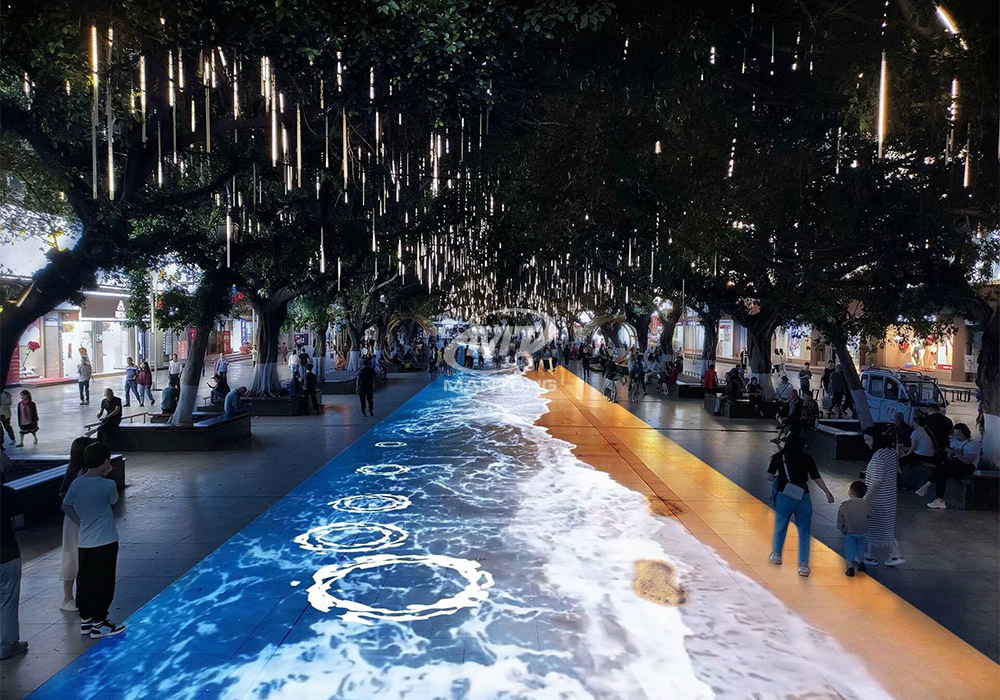
Outdoor deployments must handle daylight, weather, variable surfaces, and public safety. That is why Outdoor Projection Mapping 3D Interactive Floor Projection solutions combine high-lumen projectors, robust sensor packages, and projection-mapping software to deliver clear visuals and accurate interaction in open-air settings. The product you offer—Outdoor Projection Mapping 3D Interactive Floor Projection—is designed specifically to bring immersive experiences to outdoor scenes by addressing these variables.
Combining projection mapping with 3D interactive ground projection technology brings an unprecedented immersive experience to outdoor scenes.
Common use cases and where Interactive Floor Projection brings the most value
Interactive floor projection works well where audience engagement, wayfinding, or experiential marketing are goals. Typical applications include:
Outdoor Projection Mapping 3D Interactive Floor Projection is particularly suited to festivals, plazas, and temporary activations where large-scale visuals and outdoor durability are required.
Benefits of Interactive Floor Projection for businesses and organizations
Interactive floor systems deliver measurable business value beyond novelty:
Design best practices for successful Interactive Floor Projection
To create a high-quality interactive floor experience, follow these design guidelines:
Technical checklist before launch (: Interactive Floor Projection)
Before you go live, verify projector calibration, sensor coverage, latency targets (<50–100 ms ideal), and fallback content if sensors fail or weather deteriorates.
Outdoor considerations: durability, brightness, and environmental control
Outdoor installations require special attention to the following:
Comparing display & interaction technologies (table)
| Technology | Best for | Strengths | Limitations |
|---|---|---|---|
| Interactive Floor Projection | Engagement, large-area interaction | Scalable, immersive, flexible content | Ambient light sensitivity (mitigated by high-lumen systems outdoors) |
| LED floors | High-brightness, permanent installations | Very bright, durable, visible in daylight | Costly, heavy, less flexible for rapid content changes |
| Touchscreens / Kiosks | Direct manipulation, small-group tasks | Precise input, familiar UX | Limited scale, single-user focus |
Sources for general comparisons and industry guidance: AVIXA and projection technology overviews (see references below).
Measuring ROI and success for Interactive Floor Projection
Define KPIs that map to your business goals. Common metrics include:
Integrate analytics tools with the interactive system to collect anonymized movement data and correlate activity spikes with campaign timing.
How to plan and deploy an outdoor Interactive Floor Projection campaign (using Outdoor Projection Mapping 3D Interactive Floor Projection)
Steps to deploy:
Using a product engineered for outdoors, like Outdoor Projection Mapping 3D Interactive Floor Projection, simplifies hardware selection and ensures the system can withstand environmental challenges while delivering 3D interactive ground projection effects.
Choosing a vendor: what to look for
When selecting a vendor or system integrator, evaluate these factors:
Brand advantages and why choose our Outdoor Projection Mapping 3D Interactive Floor Projection
Our Outdoor Projection Mapping 3D Interactive Floor Projection product is designed with experienced AV engineers and interaction designers. Key advantages:
These capabilities reduce project risk and shorten deployment timelines, while delivering high-impact audience experiences that drive measurable results.
Maintenance, safety and accessibility
Outdoor interactive projections must be maintained for consistent performance. Plan for routine cleaning of optics, firmware updates, backup power, and seasonal recalibration. Prioritize safety with slip-resistant surface treatments and clear boundaries for crowds. Design interactions to be inclusive—consider different mobility needs and ensure adequate contrast for visual accessibility.
Frequently Asked Questions (FAQ) about Interactive Floor Projection and Outdoor Projection Mapping 3D Interactive Floor Projection
Q: Can interactive floor projection work in daylight?
A: Yes—outdoor systems can work in daylight if they use very high-lumen projectors, optimized content, and shading or placement that reduces direct sun on the projection area. Our Outdoor Projection Mapping 3D Interactive Floor Projection is engineered to mitigate daylight limitations.
Q: Is the technology safe for public spaces?
A: Yes. Systems can be designed with non-slip projection surfaces, clear perimeter markers, and content that avoids startling behaviors. Risk assessments and local safety codes should guide your design.
Q: How long does installation take?
A: Installation time varies by scale. Small activations can be deployed in days; larger permanent or semi-permanent projects typically take weeks for site survey, custom content production, and commissioning.
Q: What are typical costs?
A: Costs depend on projector lumen ratings, sensor coverage, protective enclosures, and content complexity. Renting for short-term events is an option; for permanent installs, budget for hardware, installation, and ongoing maintenance. Contact our sales team for a tailored quote.
Q: How is user privacy handled when tracking movement?
A: Good practice is to anonymize and aggregate movement data at the edge (no personally identifiable data stored), comply with local privacy laws, and publish a clear data-use policy. Our analytics tools are configurable to meet these standards.
Contact us / View product
Ready to explore Outdoor Projection Mapping 3D Interactive Floor Projection for your next event or space? Contact our sales team at sales@yourcompany.com or visit our product page to request a demo and quote.
References and further reading
Best Immersive Meeting Room Trends 2025: What Businesses Should Know manufacturers and supplier brands
Best professional interactive projection software manufacturers and supplier brands
Buyer's Guide: Interactive Floor Projector for Home Installations
The floor projection games Cost Guide
One-Stop Projection Solution Provider Since 2011
What's the application of Immersive projection ?
It can be used in various venues, such as art exhibition, entertainment venues, educational institution, Wedding hall /Banquet/Bar,Yoga Studio and so on. It often involves advanced projection techniques, multimedia content, and interactive elements to engage and captivate the audience's senses.
How to install the projection equipment ?
1) Install the projector in a suitable position. We will provide you with a hanger, which you need to fix on the ceiling with
screws.
2) Connect projectors, computers and other accessories through wires.
3) After completing the above 2 steps, we will carry out the edge blending steps. Our team can complete it through remote
control.
In general, installation instructions for each project need to be specified on a project-by-project basis. The above is for
reference only.
What information do you need to know before making the proposal/solution?
We know that everyone wants to know the price, but the price of our products is determined by many factors since most of our products are custom, so no ready price list. In order to fast understand what you need, can you send us an inquiry like this?
For example: I am really interested in your immersive projection products, we are a company in the USA and want to install some in my restaurant. It is about 50 meters long, and 5m in width. Projection size you can decide but the length should be not less than 20 meters. We want some content about SeaWorld because our place is all about the sea. Thank you.
What's Immersive Projection ?
Immersive projection refers to a technology that creates a captivating and all-encompassing visual experience for viewers by projecting images or videos onto large surfaces, such as walls, floors, or even entire rooms. This technology aims to immerse the audience in a simulated environment, blurring the boundaries between the physical and virtual worlds.
What about the wall/floor material for the projection?
It’s recommended to choose a light-colored material with minimal reflectivity—pure white or light grey works best. the
common material is cement & plaster board
For optimal projection results, the surface should be free of any patterns or textures, as the projector will display content
directly onto it.
There are no specific material requirements; you may use any commonly available material in your local market, as long as it
meets the above conditions.

Outdoor Projection Mapping 3D Interactive Floor Projection
Combining projection mapping with 3D interactive ground projection technology brings an unprecedented immersive experience to outdoor scenes.

Indoor Interactive Floor Projector System - Customized Design & Installation Support
Indoor interactive floor projections display dynamic themed videos on the floor, commonly used in venues aiming to enhance brand influence or attract foot traffic, such as restaurants, hotel corridors, and brand car retail stores.
By using projectors and compatible software, the interactive content is projected onto the floor, encouraging engagement between people and the projected visuals. A single 5500-lumen indoor floor projector can cover an area of 5 m × 3 m. Typically, each project will use at least 3 units to ensure broad coverage and optimal visual effects.
We also offer customized design and installation support to enhance the interactive experience for your venue.

Amusement Rapidly Rotating Bouncing Sphere Interactive Wall Floor Projection Sports Games
Rapidly Rotating Bouncing Sphere is an interactive space where participants jump on rotating spheres. As they step on it, the spheres surface will show special interactivity
Jumping on spheres of the same color in succession causes them to pop, releasing light particles. The more consecutive jumps, the greater the reward—caterpillars appear, and eventually, all spheres of that color burst, filling the space with light and even more caterpillars.

Mantong 6500LM High-Lumen Projector for Large-Scale Immersive Room Projection
Transform any space with Mantong's immersive projection mapping systems. Our high-lumen projectors (up to 6500 LM) and custom software create captivating interactive experiences for floors and walls. Ideal for museums, events, retail, and hospitality. Each kit includes professional ceiling mounting and 80+ pre-loaded video contents and is backed by a 12-month warranty and CE certification. We offer full customization and support to bring your vision to life.

Kaida Business Center, Shixin Road, Panyu District,Guangzhou City, Guangdong Province, China.
ManTong
ManTong
ManTong