
Interactive Floor Projection Hardware and Software Explained
- Interactive Floor Projection Hardware and Software Explained
- What is Interactive Floor Projection and why it matters for outdoor spaces
- Core hardware components for reliable Interactive Floor Projection
- Projector selection: brightness, resolution and durability considerations
- Sensors and tracking: how the floor becomes interactive
- Media servers and real-time engines: the software driving interactions
- Outdoor deployment challenges and practical solutions
- Calibration, alignment and maintenance: keeping the experience consistent
- Software workflows: content creation to live interaction
- Performance metrics and ROI for Interactive Floor Projection
- Quick comparative table: common hardware choices and typical ranges
- Software platform choices: pros and trade-offs
- Case uses and practical examples for Outdoor Projection Mapping 3D Interactive Floor Projection
- Operational checklist for buyers: what to ask your vendor
- Brand advantages: why choose our Outdoor Projection Mapping 3D Interactive Floor Projection
- Frequently Asked Questions (FAQ) about Interactive Floor Projection
- How bright does a projector need to be for outdoor interactive floors?
- Can interactive floor systems work in daylight?
- What sensors are best for multiple users interacting at once?
- How much maintenance does an outdoor system require?
- Is the content customizable for brand campaigns or seasonal events?
- What is the typical installation timeline?
- Contact us / View product
- Sources
Interactive Floor Projection Hardware and Software Explained
What is Interactive Floor Projection and why it matters for outdoor spaces
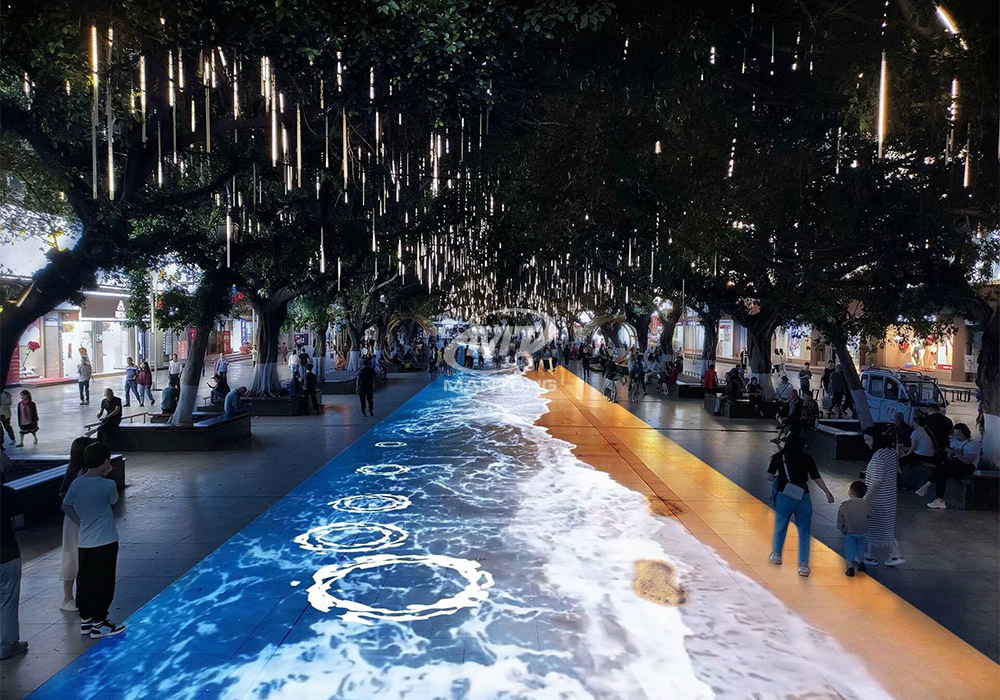
Interactive Floor Projection turns static ground surfaces into dynamic, responsive displays that react to motion, touch, or objects. Outdoor Projection Mapping 3D Interactive Floor Projection combines projection mapping with 3D interactive ground projection technology to bring an unprecedented immersive experience to outdoor scenes. This combination is ideal for public plazas, parks, retail courtyards, and event venues where engagement, wayfinding, and brand experiences are priorities. The result: a low-footprint, visually striking attraction that invites visitors to interact, linger, and share.
Core hardware components for reliable Interactive Floor Projection
Deploying an Outdoor Projection Mapping 3D Interactive Floor Projection system requires a mix of ruggedized, high-performance hardware. The most critical pieces are:
- High-brightness projectors (laser or lamp-based) — to overcome ambient daylight and deliver vivid colors.
- Interactive sensors — depth cameras, LiDAR, or infrared cameras to detect movement and gestures.
- Media servers and control computers — for real-time rendering, mapping, and input handling.
- Weatherproof housings and mounts — IP-rated enclosures and anti-vibration mounts for outdoor durability.
- Power and network infrastructure — stable power supplies, UPS systems, and wired/wireless connectivity for content updates and monitoring.
Choosing the right combination depends on site-specific variables such as ambient light, mounting height, viewing distance, and desired interaction fidelity.
Projector selection: brightness, resolution and durability considerations
For outdoor interactive floors, projector selection is arguably the most consequential decision. Key parameters to evaluate:
- Brightness (lumens) — outdoor projections typically require 8,000–30,000 lumens depending on daylight levels and screen size.
- Resolution — 1080p is a practical minimum for crisp graphics; 4K is preferred for high-detail content and large canvases.
- Contrast and color accuracy — laser projectors generally provide longer life and stable color over time.
- IP rating and cooling — projectors mounted outdoors or in semi-protected housings must tolerate temperature swings and dust.
Manufacturers to reference when specifying projectors include Barco, Christie, and Epson for high-brightness, professional-grade models.
Sensors and tracking: how the floor becomes interactive
Interaction is enabled by a sensor layer that detects users and objects on the projected surface. Common sensor options:
- Depth cameras (Time-of-Flight) — fast and accurate for multi-person tracking in varied lighting.
- Structured infrared cameras — robust for lower-cost solutions and works well at night.
- LiDAR — high accuracy for complex spatial mapping and 3D interactions.
- Pressure or capacitive sensors — used when physical contact detection is preferred.
Choosing sensor technology depends on interaction goals: gesture games, wayfinding, crowd analytics, or AR overlays. Depth cameras and LiDAR are popular for outdoor interactive floor projects because they handle varying lighting conditions and multiple users more reliably.
Media servers and real-time engines: the software driving interactions
Interactive Floor Projection needs software that can ingest sensor data, render visuals in real time, and handle projection mapping. Typical software components include:
- Real-time rendering engines — Unity, Unreal Engine, or TouchDesigner for creating responsive visuals.
- Projection mapping tools — software that warps and blends imagery to fit irregular outdoor surfaces accurately.
- Sensor middleware — software modules that translate raw sensor input into usable events (e.g., person detected, step taken).
- Content management systems (CMS) — to schedule, update, and monitor content remotely.
For outdoor installations, reliability and low latency are critical. Choose engines and middleware that support hardware acceleration (GPU rendering) and robust error handling.
Outdoor deployment challenges and practical solutions
Outdoor installations present unique challenges that must be addressed in both hardware and software design:
- Ambient light — mitigate with higher-lumen projectors, careful placement (e.g., evening operation), or lighter content palettes.
- Weather exposure — use IP-rated enclosures, drainage planning, and corrosion-resistant materials.
- Power stability — include surge protection and UPS units to protect media servers and projectors.
- Security and vandalism — use tamper-proof mounts, secure enclosures, and remote monitoring to detect intrusions.
Planning for these factors early in the design reduces lifecycle costs and downtime.
Calibration, alignment and maintenance: keeping the experience consistent
Accurate calibration and regular maintenance ensure a pristine Interactive Floor Projection experience. Key activities include:
- Initial geometric calibration — mapping projector output to ground contours and obstacles using automated tools or manual markup.
- Color and gamma calibration — keeping multiple projectors color-matched to prevent visible seams.
- Sensor recalibration — scheduled checks for tracking accuracy after environmental changes.
- Routine hardware checks — lens cleaning, enclosure seals, and projector light source health monitoring.
Remote monitoring and logging reduce on-site visits by enabling predictive maintenance and quick fault diagnosis.
Software workflows: content creation to live interaction
Typical software workflow for Outdoor Projection Mapping 3D Interactive Floor Projection:
- Concept and UX design — define interaction goals and visitor journeys.
- Content production — create assets (2D/3D), animations, and audio tailored to size and viewer distance.
- Mapping and prototyping — use prototyping tools to test interactions in a simulated environment.
- Integration — link sensors to the rendering engine and fine-tune latency and smoothing parameters.
- Deployment and monitoring — publish content and monitor performance and user metrics.
Using a modular software architecture lets teams update visuals and interaction logic without touching hardware—a major advantage for seasonal campaigns or promotions.
Performance metrics and ROI for Interactive Floor Projection
Clients often ask how to measure success. Useful metrics include:
- Engagement time per visitor — average duration interacting with the projection.
- Foot traffic lift — change in visits before and after installation.
- Content plays and repeat interactions — indicating appeal and replay value.
- Social shares and impressions — marketing value derived from user-generated content.
These KPIs can be captured through a combination of sensor logs, anonymized tracking, and analytics tied into the CMS. A well-designed interactive floor often yields higher dwell time and stronger brand recall than static signage.
Quick comparative table: common hardware choices and typical ranges
| Component | Typical Range / Option | Why it matters |
|---|---|---|
| Projector Brightness | 8,000 – 30,000 lumens | Overcomes ambient light; affects size and clarity |
| Resolution | 1920x1080 (FHD) – 3840x2160 (4K) | Higher detail for close-range interactions |
| Sensors | Depth camera / LiDAR / IR camera | Accuracy of interaction detection in varied light |
| Protection | IP65+ housings, tempered lenses | Ensures longevity in outdoor environments |
Sources for component specifications include major AV manufacturers' product pages (see sources below).
Software platform choices: pros and trade-offs
Popular platforms and their strengths:
- Unity / Unreal Engine — excellent for complex 3D interactions and AR overlays; larger development cycle.
- TouchDesigner — great for real-time visuals, fast prototyping, and integration with sensors; widely used by AV studios.
- Notch — strong for real-time VFX and interactive media with timeline-based tools.
- Custom middleware — offers full control and integration with analytics and CMS, but higher upfront development cost.
Choose a platform based on content complexity, update cadence, and the development team's expertise.
Case uses and practical examples for Outdoor Projection Mapping 3D Interactive Floor Projection
Common real-world uses include:
- Public art installations that react to crowd movement and create memorable experiences.
- Retail plazas that use interactive floors for promotions and wayfinding.
- Events and festivals where projection mapping enhances programming and photo opportunities.
- Museums and cultural sites that use interactive floors to tell stories and engage families.
These use cases leverage the product's ability to create social moments—people are likely to stop, interact, and share their experience online.
Operational checklist for buyers: what to ask your vendor
When evaluating an Outdoor Projection Mapping 3D Interactive Floor Projection solution, ask your vendor the following:
- What are the projector lumen and resolution specs for my site conditions?
- How are sensors protected and how do they perform in sunlight and rain?
- Can the system be remotely monitored and updated?
- What warranties, SLAs, and maintenance plans are offered?
- Can you demonstrate previous outdoor installations and provide references?
These questions will reveal whether the vendor understands outdoor constraints and can offer long-term operational support.
Brand advantages: why choose our Outdoor Projection Mapping 3D Interactive Floor Projection
Our system combines industry-leading hardware selection with flexible, scalable software so clients can deploy immersive interactive floors outdoors with confidence. Brand advantages include:
- End-to-end service — from site survey and content design to installation and remote monitoring.
- Ruggedized components — IP-rated enclosures and industrial-grade projectors chosen for longevity.
- Modular software — supports rapid content updates, analytics, and multi-site orchestration.
- Proven UX — interaction patterns tested for safety, accessibility, and audience engagement.
- Comprehensive SLA and maintenance plans — minimizing downtime and protecting your investment.
These strengths make our Outdoor Projection Mapping 3D Interactive Floor Projection a reliable choice for brands, municipalities, and venues seeking measurable engagement improvements.
Frequently Asked Questions (FAQ) about Interactive Floor Projection
How bright does a projector need to be for outdoor interactive floors?
Typical outdoor interactive floor setups use projectors in the 8,000–30,000 lumen range. The exact brightness depends on ambient light, projection area, and whether the installation will operate primarily at night or during daylight. Higher lumens enable clearer images in brighter conditions.
Can interactive floor systems work in daylight?
Yes, but daylight deployments require higher brightness projectors, careful content contrast, and sometimes additional shading or placement under overhangs. For full-day operation, system design must plan for peak sunlight conditions.
What sensors are best for multiple users interacting at once?
Depth cameras (Time-of-Flight) and LiDAR are preferred for multi-user environments because they offer better separation between users and can reliably detect multiple simultaneous interactions under varied lighting.
How much maintenance does an outdoor system require?
Routine maintenance includes periodic lens cleaning, seal inspections, firmware updates, and sensor recalibration. With ruggedized housings and remote monitoring, maintenance intervals can be extended and made predictive rather than reactive.
Is the content customizable for brand campaigns or seasonal events?
Yes. The modular software architecture supports rapid content swaps and scheduling. Campaigns can be updated remotely through the CMS without physical intervention.
What is the typical installation timeline?
Small to medium installations typically take 2–6 weeks from site survey to go-live (including content prep). Large or complex sites with multiple projectors and custom surfaces can take longer. Early site surveys and a clear approval path shorten timelines.
Contact us / View product
If you're ready to explore Outdoor Projection Mapping 3D Interactive Floor Projection for your site, contact our experts for a site survey, custom proposal, and ROI assessment. Click to request a demo or contact sales to view product specifications and case studies.
Sources
- Barco product pages and whitepapers — information on high-brightness projectors and outdoor housings (barco.com).
- Christie Digital product specifications — professional projection systems and industrial projectors (christiedigital.com).
- Epson Pro AV product documentation — large-venue projector specs and installation guidance (epson.com).
- TouchDesigner / Notch / Unity official sites — capabilities of real-time rendering and interactive media engines (derivative.ca, notch.one, unity.com).
- Industry reports and market trends from AVIXA (InfoComm) and Grand View Research covering projection mapping and experiential display markets.
The mapping floor projection Cost Guide
Interactive Floor Projector Price Breakdown for Procurement
Case Study: Immersive Rooms Transforming Corporate Training
Cost and ROI: Investing in an Interactive Projection Solution
One-Stop Projection Solution Provider Since 2011
What's the application of Immersive projection ?
It can be used in various venues, such as art exhibition, entertainment venues, educational institution, Wedding hall /Banquet/Bar,Yoga Studio and so on. It often involves advanced projection techniques, multimedia content, and interactive elements to engage and captivate the audience's senses.
How to install the projection equipment ?
1) Install the projector in a suitable position. We will provide you with a hanger, which you need to fix on the ceiling with
screws.
2) Connect projectors, computers and other accessories through wires.
3) After completing the above 2 steps, we will carry out the edge blending steps. Our team can complete it through remote
control.
In general, installation instructions for each project need to be specified on a project-by-project basis. The above is for
reference only.
How to Write an Interactive-Effect Video Customisation Script ?
① Project Background: Briefly introduce the context in which this interactive scene will be used (e.g., exhibition, museum,
event space, children's area). Example: This scene is part of the “Underwater World” zone in a children's science museum,
designed to be engaging and exploratory.
②Visual Style / Atmosphere: What kind of visual mood are you aiming for? Please describe the color scheme, style, and any
references. it should focus solely on describing the visual aspects of the scene, supported by relevant charts or reference
images.
③ Interaction Points Overview:List each interactive hotspot along with the effect you'd like to trigger when the user
touches or clicks the area. example: when player touch the clownfish, it will swims away with bubble trail (animation effect)
and produce the bubble sound ( sound effect requirement )
④ Static Visual Reference:including but not limited to background image/video, a list of major visual elements (e.g., coral,
rocks, seaweed, fish), which elements should be interactive?
Are you trader or manufacturer ?
We are direct manufacturer who specialize in providing one-stop solution for different outdoor & indoor projection project with our stable software and qualified projectors
What about the wall/floor material for the projection?
It’s recommended to choose a light-colored material with minimal reflectivity—pure white or light grey works best. the
common material is cement & plaster board
For optimal projection results, the surface should be free of any patterns or textures, as the projector will display content
directly onto it.
There are no specific material requirements; you may use any commonly available material in your local market, as long as it
meets the above conditions.

Outdoor Projection Mapping 3D Interactive Floor Projection
Combining projection mapping with 3D interactive ground projection technology brings an unprecedented immersive experience to outdoor scenes.

Indoor Interactive Floor Projector System - Customized Design & Installation Support
Indoor interactive floor projections display dynamic themed videos on the floor, commonly used in venues aiming to enhance brand influence or attract foot traffic, such as restaurants, hotel corridors, and brand car retail stores.
By using projectors and compatible software, the interactive content is projected onto the floor, encouraging engagement between people and the projected visuals. A single 5500-lumen indoor floor projector can cover an area of 5 m × 3 m. Typically, each project will use at least 3 units to ensure broad coverage and optimal visual effects.
We also offer customized design and installation support to enhance the interactive experience for your venue.

Amusement Rapidly Rotating Bouncing Sphere Interactive Wall Floor Projection Sports Games
Rapidly Rotating Bouncing Sphere is an interactive space where participants jump on rotating spheres. As they step on it, the spheres surface will show special interactivity
Jumping on spheres of the same color in succession causes them to pop, releasing light particles. The more consecutive jumps, the greater the reward—caterpillars appear, and eventually, all spheres of that color burst, filling the space with light and even more caterpillars.

Mantong 6500LM High-Lumen Projector for Large-Scale Immersive Room Projection
Transform any space with Mantong's immersive projection mapping systems. Our high-lumen projectors (up to 6500 LM) and custom software create captivating interactive experiences for floors and walls. Ideal for museums, events, retail, and hospitality. Each kit includes professional ceiling mounting and 80+ pre-loaded video contents and is backed by a 12-month warranty and CE certification. We offer full customization and support to bring your vision to life.

Kaida Business Center, Shixin Road, Panyu District,Guangzhou City, Guangdong Province, China.
ManTong
ManTong
ManTong